
5 posts tagged with "release"

View All Tags

Release 0.15.0

· 5 min read

Major changes

Reservoir — New Storage Backend

A brand-new storage backend called Reservoir has been introduced and is now the recommended storage solution for all deployments. Reservoir is designed for cloud-native workloads and provides a multi-tier architecture:

  • In-Flight Buffer — volatile RAM layer for Read-Your-Own-Writes consistency.
  • Local Disk Cache — immutable, CRC-verified cache of 64 MB blobs fetched on-demand from remote storage.
  • Persistent Storage — authoritative state in cloud object storage (Azure Blob Storage, local disk, etc.).

Key design highlights include page packing into large immutable files to minimize cloud API calls, CRC32/CRC64 checksums at page and file level for data integrity, snapshot checkpoints for fast recovery, and automatic compaction of fragmented files.

Legacy storage backends (FasterKV, temporary file cache, SQL Server) remain available but are no longer recommended for new deployments. FasterKV has been moved to its own NuGet package (FlowtideDotNet.Storage.FasterKV) and is no longer included by default.

To learn more, visit State Persistence docs.

StarRocks Connector

A new connector for StarRocks has been added, starting with a sink operator. The StarRocks sink writes data using the built-in Stream Load mechanism and requires the target table to have a primary key defined for upsert and delete support.

Two execution modes are available:

  • OnCheckpoint — data is committed transactionally at checkpoint boundaries.
  • OnWatermark — data is flushed on each watermark for lower latency (at-least-once semantics).

To learn more, visit StarRocks Connector docs.

OpenLineage Support

Flowtide now has built-in support for reporting data lineage events to an OpenLineage-compatible endpoint over HTTP. When enabled, the reporter automatically sends lineage events as the stream transitions between states (starting, running, completed, or failed). Schema information can optionally be included in the events.

To learn more, visit OpenLineage docs.

INSERT OVERWRITE for Delta Lake

The Delta Lake connector now supports INSERT OVERWRITE {tableName} as an alternative to INSERT INTO. This replaces all content in the delta table with the new data from the stream on the initial load. After the initial overwrite, subsequent inserts, updates, and deletes behave normally. The existing data is committed as remove operations in the delta log, so the full table history is preserved.

Additionally, column mapping is now supported when writing to delta tables.

SpiceDB materialize_permission Table Function

The SpiceDB connector has been refactored and now exposes a materialize_permission SQL table function for easily denormalizing permissions directly in your queries. The function automatically fetches the schema from SpiceDB at plan-build time, removing the need for manual schema loading.

SELECT subject_type, subject_id, relation, resource_type, resource_id
FROM spicedb.materialize_permission('document', 'view')

To learn more, visit SpiceDB Connector docs.

.NET 10 Support

Flowtide now targets .NET 10 in addition to .NET 8, allowing projects on the latest runtime to benefit from the newest performance improvements and language features.

Minor changes

New SQL Functions

Several new scalar and aggregate functions have been added:

  • datediff — calculates the difference between two dates in a specified date part.
  • round_calendar — rounds a timestamp to a calendar boundary (e.g., start of hour, day, month).
  • xxhash64 — computes an xxHash64 hash of input values.
  • log10 — computes the base-10 logarithm.
  • count_distinct — aggregate function that counts distinct values.
  • avg (window function) — average is now available as a window function. A bug with using window functions inside recursive CTEs has also been fixed.

Generic Data Sink: Fetch Existing Data

The generic data sink now allows fetching existing data from the target on initial startup. This is used to compare against incoming data to avoid duplicates and to produce deletes for data that is no longer present in the stream result.

SharePoint Source Refactored to Column-Based Data

The SharePoint source has been rebuilt to use column-based data and now supports resync operations.

JsonElement Support in C# Object Converter

The C# object converter now supports JsonElement as a type, allowing direct mapping of JSON data when converting objects to columns.

Precompiled Frontend

The ASP.NET Core monitoring UI now ships with a precompiled frontend. Node.js is no longer required to build the project.

Kafka Improvements

  • Tombstone events are now skipped during initial load when loading existing data from Kafka.
  • The Kafka sink can once again handle deleted rows during initial batch processing.

Delta Lake Source Fixes

  • The delta lake source can now read tables that only have a checkpoint as the first entry.
  • A fix ensures correct difference detection in column batch reads.

Memory Optimization for Window Functions

Memory allocation on the managed heap has been reduced for MIN/MAX window functions, decreasing GC pressure.

Bug Fixes

  • Union column insert range — fixed incorrect count calculation when null values are present in the range.
  • C# Object Sink — fixed an exception when removing a row with a non-nullable field.
  • SQL case sensitivity — single identifiers in SQL are no longer case sensitive.
  • Surrogate key / upper metadataupper and surrogate key int64 now return correct types for metadata.
  • Plan serializationlist and map types now serialize correctly to JSON when serializing the plan.
  • Delta load task reset — fixed an issue where the delta load task was not reset when a full load followed a delta load.
Release 0.14.0

· 2 min read

Major changes

Window functions support

Flowtide now support SQL window functions such as ROW_NUMBER, SUM, LEAD, LAG. This is a quite new feature and any feedback would be highly appreciated.

To learn which functions are supported please visit docs.

Qdrant Connector

A connector for Qdrant has been added to make it easy to integrate data to be used by AI or other tools that rely on a vector database. This connector allows easy near real-time synchronization of data used by Qdrant.

To learn more how to use the Qdrant connector please visit docs.

New test framework

A new framework has been released called FlowtideDotNet.TestFramework to help simplify the process of doing integration testing of streams.

To learn more please visit docs.

Minor changes

SQL Server Connector Changes

The SQL Server connector has been rebuilt to support tables without change tracking (including views). This works by polling all data, so it should not be used in large tables, but can give a quick start to experiment with a tables data before enabling change tracking.

Optimizations has been added for partitioned tables, to give quick selects from large tables where each partition is fetched individually to reduce the cost of cross-partition queries.

Release 0.13.0

· 2 min read

Major changes

New serializer to improve serialization speed

A new custom serializer has been implemented that follows the Apache Arrow serialization while minimizing extra allocations and memory copies.

Additionally, the default compression method was also changed from using ZLib to Zstd. This change was also made to improve serialization performance.

Support for pause & resume

A new feature has been added to allow pausing and resuming data streams, making it easier to conduct maintenance or temporarily halt processing without losing state.

For more information, visit https://koralium.github.io/flowtide/docs/deployment/pauseresume.

Integer column changed from 64 bits to dynamic size

The integer column was changed to now instead select the bit size based on the data inside of the column. This change reduces memory usage for columns with smaller integer values. Bit size is determined on a per-page basis, so pages with larger values will only use higher bit sizes when necessary.

Delta Lake Support

This version adds support to both read and write to the Delta Lake format. This allows easy integration to data lake storage. To learn more about delta lake support, please visit: https://koralium.github.io/flowtide/docs/connectors/deltalake

Custom data source & sink changed to use column based events

Both the custom data source and sink have now been changed to use column based events. This improves connector performance by eliminating the need to convert data between column-based and row-based formats during streaming.

Minor changes

Elasticsearch connector change from Nest to Elastic.Clients.Elasticsearch

The Elasticsearch connector has been updated from the deprecated Nest package to Elastic.Clients.Elasticsearch. This change requires stream configurations to be adjusted for the new connection settings.

Additionally, connection settings are now provided via a function, enabling dynamic credential management, such as rolling passwords.

Add support for custom stream listeners

Applications can now listen to stream events like checkpoints, state changes, and failures, allowing for custom exit strategies or monitoring logic.

Example:

.AddCustomOptions(s =>
{
s.WithExitProcessOnFailure();
});

Cache lookup table for state clients

An internal optimization adds a small lookup table for state client page access, reducing contention on the global LRU cache. This change has shown a 10–12% performance improvement in benchmarks.

Release 0.12.0

· One min read

Major changes

All Processing Operators Updated to Column-Based Events

All processing operators now use the column-based event format, leading to better performance. However, some sources and sinks for connectors still use the row-based event format. Additionally, a few functions continue to rely on the row-based event format.

MongoDB Source Support

This release adds support to read data from MongoDB, this includes using MongoDBs change stream to directly react on data changes.

SQL Server Support for Stream State Persistence

You can now store the stream state in SQL Server. For setup instructions, refer to the documentation: https://koralium.github.io/flowtide/docs/statepersistence#sql-server-storage

Timestamp with Time Zone Data Type

A new data type for timestamps has been added. This ensures that connectors can correctly use the appropriate data type, especially when writing. For example, writing to MongoDB now uses the BSON Date type.

Minor Changes

Virtual Table Support

Static data selection is now supported. Example usage:

INSERT INTO output 
SELECT * FROM
(
VALUES
(1, 'a'),
(2, 'b'),
(3, 'c')
)

Release 0.11.0

· 3 min read

Major Changes

Column-Based Event Format

Most operators have transitioned from treating events as rows with flexbuffer to a column-based format following the Apache Arrow specification. This change has led to significant performance improvements, especially in the merge join and aggregation operators. Transitioning from row-based to column-based events involved a major rewrite of core components, and some operators still use the row-based format, which will be updated in the future.

Not all expressions have been converted to work with column data yet. However, the solution currently handles conversions between formats to maintain backward compatibility. Frequent conversions may result in performance decreases.

The shift to a column format also introduced the use of unmanaged memory for new data structures, for the following reasons:

  • 64-byte aligned memory addresses for optimal SIMD/AVX operations.
  • Immediate memory return when a page is removed from the LRU cache, instead of waiting for the next garbage collection cycle.

With unmanaged memory, it is now possible to track memory allocation by different operators, providing better insight into memory usage in your stream.

B+ Tree Splitting by Byte Size

Previously, the B+ tree determined page sizes based on the number of elements, splitting pages into two equal parts when the max size (e.g., 128 elements) was reached. While this worked for streams with uniform element sizes, it led to size discrepancies in other cases, affecting serialization time and slowing down the stream.

This update introduces page splitting based on byte size, with a default page size of 32KB, ensuring more consistent and predictable page sizes.

Initial SQL Type Validation

This release contains the beginning of type validation when creating a Substrait plan using SQL. Currently, only SQL Server provides specific type metadata, while sources like Kafka continue to designate columns as 'any' due to varying payload types.

The new validation feature raises exceptions for type mismatches, such as when a boolean column is compared to an integer (e.g., boolColumn = 1). This helps inform users transitioning from SQL Server that bit columns are treated as boolean in Flowtide.

New UI

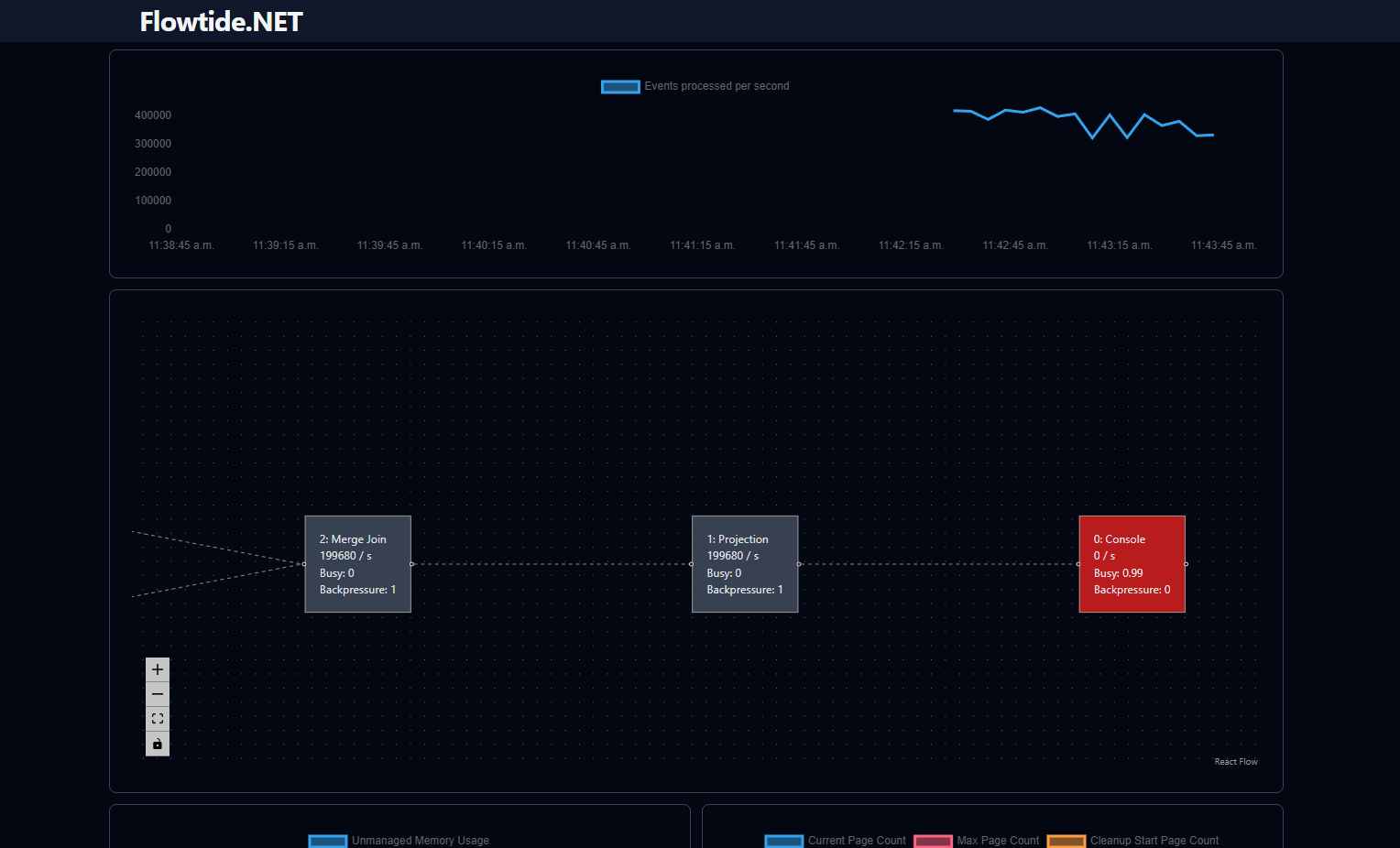
new UI

A new UI has been developed, featuring an integrated time series database that enables developers to monitor stream behavior over time. This database’s API aligns with Prometheus standards, allowing for custom queries to investigate potential issues.

The UI retrieves all data through the Prometheus API endpoint, enabling future deployment as a standalone tool connected to a Prometheus server.

Minor Changes

Congestion Control Based on Cache Misses

Flowtide processes data in small batches, typically 1-100 events. While this approach works well with in-memory data, cache misses that require persistent storage access can create bottlenecks. This is particularly problematic with multiple chained joins, where sequential data fetching can delay processing.

To address this, the join operator now monitors cache misses during a batch and, when a threshold is reached, splits the processed events and forwards them to the next operator. This change allows operators to access persistent storage in parallel, easing congestion.

Reduce the amount of pages written to persistent storage

Previously, all B+ tree metadata was written to persistent storage at every checkpoint, including root page IDs. In streams with numerous operators, this led to unnecessary writes.

Now, metadata is only written if changes have occurred, reducing the number of writes and improving storage efficiency.